Rummy Safety: Check the App Permission List Before Signing In
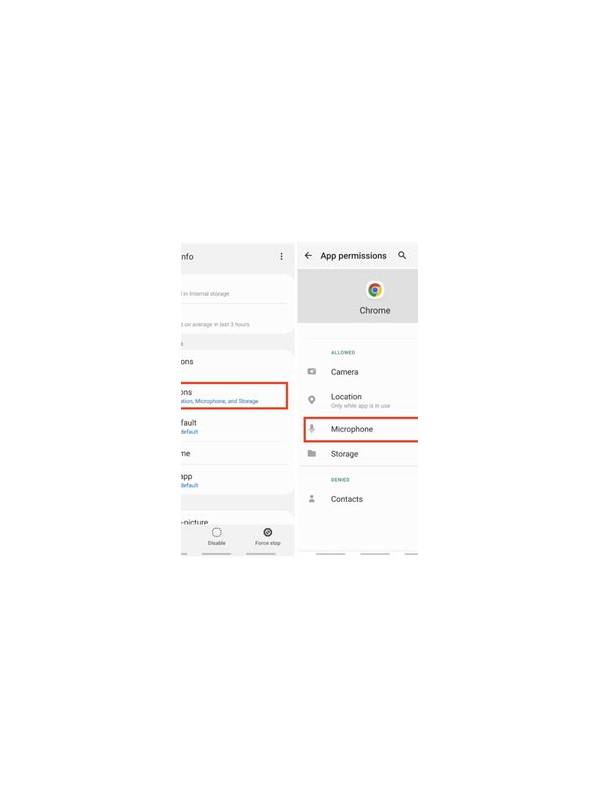
A game application may request permissions that have little to do with playing cards. Before signing in, review what the app wants to access and whether each request has a clear purpose. Camera, microphone, contacts, storage, and location permissions deserve separate attention. A familiar-looking logo is not proof that every request is appropriate.
Install from a source you can verify and inspect the publisher information carefully. Read the permission prompts in full rather than tapping through them automatically. If an app asks for contacts when you only need a player name, decline and see whether the core feature still works. A refusal that breaks unrelated functionality is useful information about the app’s design.
Use the operating system’s privacy settings to review permissions after installation. Disable access that is not necessary, and check whether permissions are being re-enabled after updates. Do not grant access merely because the prompt says it will improve convenience. Convenience should be weighed against the amount of personal information exposed and the sensitivity of the device.
Treat login and payment prompts separately. Confirm that the address, support route, and terms are genuine before entering personal or financial information. Never share a one-time code with a person claiming to be support. If an unexpected permission or urgent payment message appears, close the app and verify through an independent channel.
Good safety practice is a short preflight check, not a promise that an app is risk-free. Keep the device updated, use a unique password, and remove apps you no longer use. If the application cannot explain why it needs sensitive access, pause rather than accepting the request under pressure.
For extra protection, review notification previews and clipboard access as well. A verification code displayed on a lock screen or copied into an unknown app can be exposed even when the main permission list looks reasonable. Use screen locks, keep backups current, and install updates from the device’s normal channel. Safety checks are most effective when they are routine and quiet, before a new application has created a sense of urgency.
If a permission cannot be changed, reconsider whether the application belongs on the device. Removing an unnecessary app is a valid safety decision, especially when its publisher or update behavior is unclear.